

Planning a small business website can quickly turn into a long list of pages, features and technology choices. Should you include a blog? Do you need online booking? Is a chatbot expected now?
Those questions can matter, but they are not the best place to begin. When deciding what a small business website should include, start with the job it needs to do.
A useful website helps the right people understand the business, decide whether they trust it and take an appropriate next step. Everything included should support that journey without creating unnecessary complexity for the customer or the team managing the site.
Start with a clear website goal
Before choosing pages or features, define what the website needs to achieve.
A small business website may need to:
- Generate enquiries
- Explain services clearly
- Establish trust before a customer makes contact
- Help local customers find the business
- Support bookings or purchases
- Answer common customer questions
Not every website needs to do all of these things. A local trade business may primarily need quote requests, while a professional services firm may need to explain complex services and establish credibility.
The purpose of the website should determine what is included, rather than the structure of another business.
A homepage that explains the business quickly
The homepage should help a new visitor understand the business without already knowing the company.
Near the top of the page, it should usually communicate:
- What the business does
- Who it helps
- Where it operates, when location is relevant
- Why a customer should trust it
- What the visitor should do next
A generic headline such as “Welcome to our website” gives the customer little information. A clearer alternative might be:
Residential and commercial electrical services across West Auckland.
This gives the visitor immediate context. Supporting copy can explain the work offered, areas served and why the business may be suitable.
The homepage does not need every detail. Its role is to establish relevance and guide people towards the next useful page or action.
Focused service or product pages
If a business offers several distinct services, each important service should usually have enough space to be explained properly.
A useful service page can answer:
- Who is this service for?
- What problem does it address?
- What does the service involve?
- What evidence or useful details will help the customer decide?
- What is the next step?
This is more useful than listing service names on the homepage and expecting visitors to contact the business for basic information. Focused pages also create a clearer structure and help search engines understand the subject of each page.
Avoid thin pages that repeat the same generic description. A smaller number of specific pages is easier for customers to understand and for the business to maintain.
Trust and evidence
Customers often visit a website to reduce uncertainty before making contact.
The right proof will depend on the type of business, but useful trust signals can include:
- Real project examples or case studies
- Customer reviews or testimonials
- Relevant qualifications and certifications
- Clear team or founder information
- Accurate business and contact details
Proof should be specific and honest. A short explanation of a real project can be more useful than broad statements such as “leading solutions” or “unmatched quality”. For founder-led and professional service businesses, showing who is behind the work can also make the company feel more accountable.
If the business does not yet have many reviews or case studies, explain the process clearly, show relevant experience and add stronger evidence as it becomes available.
A simple path to contact or enquire
Once a visitor decides the business may be suitable, the next action should be obvious.
Depending on the business, this may be a phone call, email, enquiry form, quote request, booking, visit or purchase.
Contact details should be easy to find, particularly on mobile. Calls to action should use clear language such as “Request a quote”, “Book a consultation” or “Start a conversation”.
An enquiry form should ask only for useful information. It also helps to explain what happens after submission so the customer knows what to expect.
The site should also provide accurate practical information. This may include the business name, contact details, location or service area, opening hours, directions, relevant policies and actively maintained social profiles.
For local businesses, someone should be able to confirm quickly whether the business serves their area and how to make contact. Information should remain consistent across the website, Google Business Profile and other important listings.
Mobile usability, performance and accessibility
A small business website should work properly on phones, tablets and desktop screens. Mobile usability is not simply fitting the same design onto a smaller display.
Consider what customers are likely to do from a phone, such as checking a service, finding the location or phone number, reading a review or submitting an enquiry.
Text should be readable, navigation understandable and buttons easy to use. Forms need to work with a mobile keyboard, and important information should not be hidden behind unnecessary interactions.
The technical foundation should support reliable loading, appropriately sized images, working links and forms, sufficient contrast, clear heading structure, keyboard access, useful alternative text and a secure connection.
Test important tasks on a real phone and consider performance and accessibility throughout planning and development. The goal is a website customers can use comfortably and the business can rely on.
A content system the business can maintain
A website will need to change after launch. Before choosing a content management system, decide what the team will need to update regularly.
For example:
- Service descriptions
- Team profiles
- Projects or case studies
- Frequently asked questions
- News or Insights articles
- Locations and opening information
The editing experience should suit the people responsible. A small website with infrequent changes may need only a simple system, while an organisation publishing structured information across many pages may benefit from a more capable CMS.
More flexibility is not automatically better. The right system makes routine updates clear and safe.
If content updates are already difficult, our guide to five signs your business website needs an upgrade explains when the website may need attention.
Basic search and measurement foundations
A website should be structured so that people and search engines can understand it.
Useful foundations include:
- Clear page titles and descriptions
- One primary topic for each important page
- Descriptive headings
- Understandable URLs
- Internal links between related pages
- A sitemap and indexing checks
- Analytics and enquiry tracking
These elements do not replace useful content or a good customer experience. They help make that content easier to discover and understand.
Measurement should connect to a business goal. Page views can be useful, but enquiries, bookings, calls and visits to important service pages often provide more meaningful signals.
What a small business website may not need
Planning a website is also about deciding what to leave out.
Not every business needs:
- A blog that no one has time to maintain
- Complex animation
- Accounts and customer dashboards
- A chatbot
- AI-generated content
- Online booking
- Ecommerce
- A custom application
- Many integrations
Each additional feature introduces cost, maintenance or customer complexity. Include it when it supports a real need, not simply because it appears modern.
If an existing website has accumulated too many workarounds or no longer supports the business cleanly, it may be time to consider a more substantial change. Our guide to choosing between a website redesign and rebuild can help clarify the appropriate level of work.
A practical small business website structure
The exact structure will vary, but a focused service-business website might include:
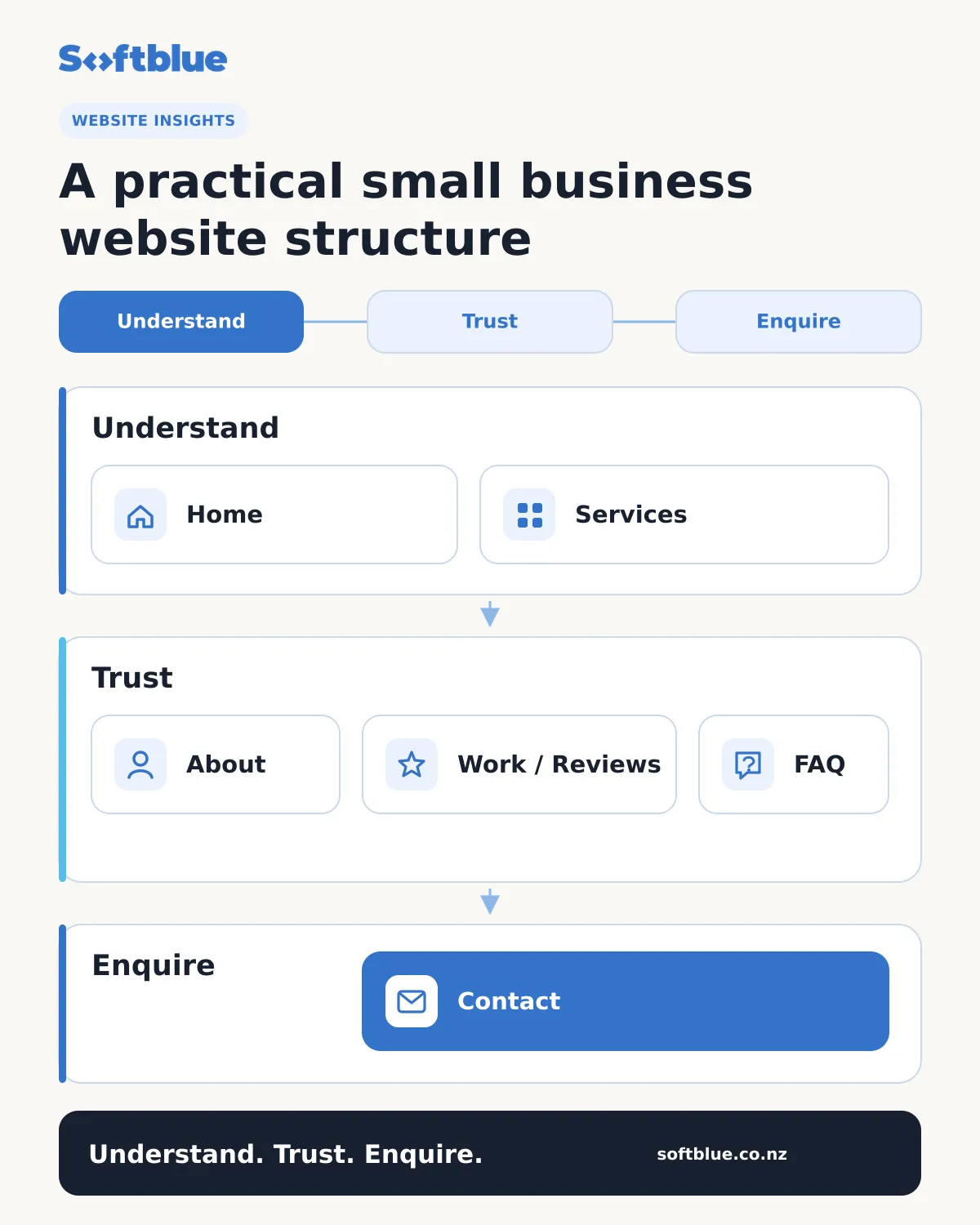
- Home: The business, primary services, strongest proof and next action.
- Services: Dedicated pages for important or distinct services.
- About: The people, experience and approach behind the work.
- Work, case studies or reviews: Evidence of what the business has done and who it supports.
- Frequently asked questions: Answers to genuine customer questions.
- Contact: An easy enquiry path with location, service-area and response information.
Some businesses will also need Insights, locations, pricing, booking, ecommerce or customer-support sections. Add them because the customer journey requires them, not because every website is expected to have the same pages.
Small business website planning checklist
Before design or development begins, confirm that you can answer the following questions:
- Who is the website primarily for?
- What should those visitors understand?
- What action should they take?
- Which services or products need dedicated pages?
- What real evidence can the business show?
- What information needs to be updated regularly?
- Which mobile tasks are most important?
- How will enquiries or other useful outcomes be measured?
- Which features are essential now, and which can wait?
Clear answers make it easier to avoid spending time on pages or functionality that provide little value.
Once you know what your website needs to include, the next step is defining the scope and comparing proposals. Our guide to why website quotes vary explains what to check beyond the headline price.
Build the smallest useful website that supports the business
A good small business website does not need to be the largest or most technically complex website in its market.
It needs to be clear, credible, easy to use and practical to maintain.
Start with the customer, the business goal and the information required to connect the two. Choose the pages, content and technology after those needs are understood.
At Softblue, we design and build modern websites and web applications around real business requirements. We focus on the smallest useful level of solution, with careful attention to clear communication, performance and long-term maintainability.
You can also view selected Softblue work to see how we approach websites, structured content and web applications.
If you are planning a new website or reconsidering what your current website should include, start a conversation with Softblue. We can help you clarify the requirements and identify a practical next step.